Installation & Setup
Step 1: Add the Platform Script
Add the following script tag to your website's <head> element:
<head>
  <script src="https://amplify-cdn.consumerism.pressganey.com/scripts/amplify-widgets.cdn.js"></script>
</head>
Step 2: Add Widget Containers
Add a <div> element wherever you want a widget to appear. The class attribute determines the widget type, and data attributes configure which data to display.
Every widget requires:
pg-amplify-widget-id— your unique widget/application ID- Either
pg-amplify-person-idorpg-amplify-location-id(never both) for medical clients personId is the same as providerId. - for full list of amplify widget attributes see the Reference Page
Summary Widget
<div
  class="amplify-summary"
  pg-amplify-widget-id="553889023719429"
  pg-amplify-person-id="8592906925"
  pg-amplify-person-name="Dr. Loveby Varghese"
></div>
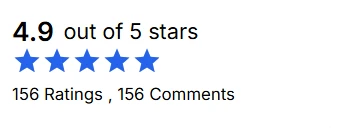
The base summary widget displays a compact star rating and review count. It is not interactive on its own — for a linked experience that navigates to a detail view, see Navigation & Routing.
AI Summary
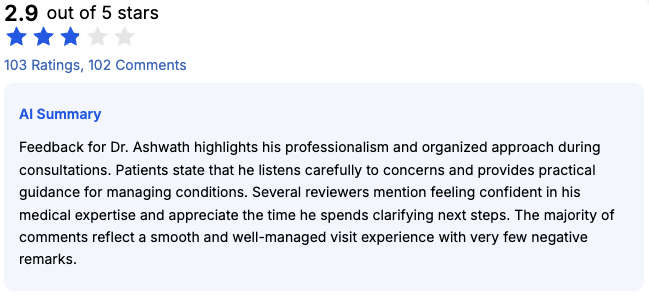
AI summaries can be enabled via the toggle in the Amplify admin UI. When enabled, an automatically generated summary of reviews appears as part of the summary widget. AI summaries default to a 90-day window, which can be adjusted by the PG dev team.
AI summaries at this time cannot be displayed on their own — they are always part of the summary widget this will be updated in the future.
Question-Level Summary
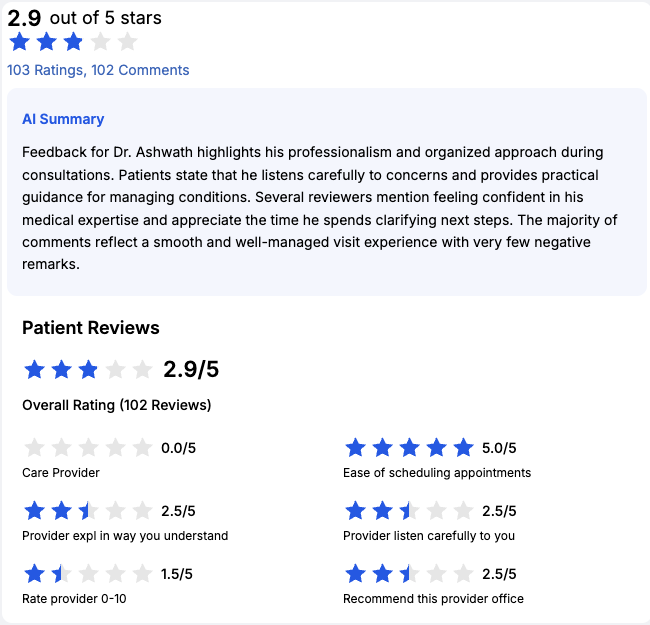
This optional section is also controlled by a toggle in the Amplify admin UI. It displays the individual survey questions used to compute the aggregate overall score.
Like the AI summary, the question-level summary cannot be displayed on its own — it is paired with the base summary widget.
Detail Widget
<div
  class="amplify-detail"
  pg-amplify-widget-id="553889023719429"
  pg-amplify-person-id="8592906925"
  pg-amplify-person-name="Dr. Loveby Varghese"
></div>
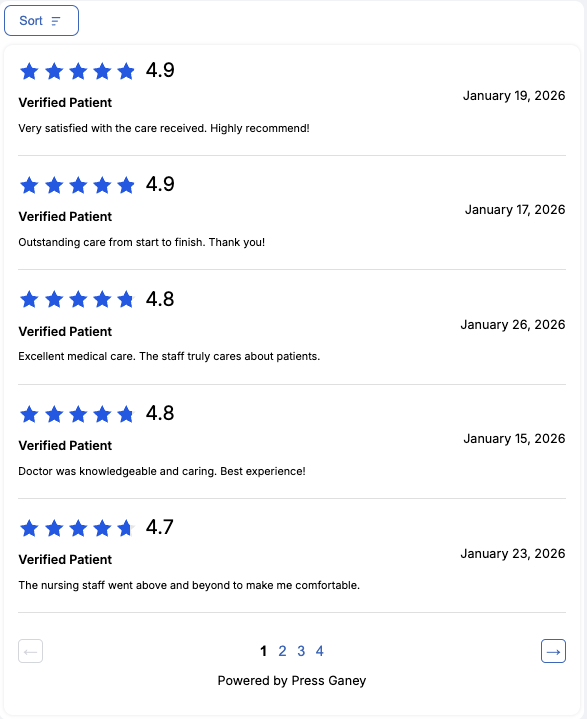
The detail widget displays full review content with individual comments and pagination. There is no restriction on how many detail widgets you can add to a page.
Summary + Detail Widget
When you create a Summary + Detail widget type in the Widget Builder, both widgets share the same configuration. Use the same pg-amplify-widget-id for both:
<!-- Summary widget -->
<div
  class="amplify-summary"
  pg-amplify-widget-id="553889023719429"
  pg-amplify-person-id="8592906925"
  pg-amplify-person-name="Dr. Loveby Varghese"
></div>

<!-- Detail widget -->
<div
  class="amplify-detail"
  pg-amplify-widget-id="553889023719429"
  pg-amplify-person-id="8592906925"
  pg-amplify-person-name="Dr. Loveby Varghese"
></div>
When both widgets are on the same page, clicking interactions in the summary (like "View all ratings" or "Read comments") will smoothly scroll to the detail widget and open the corresponding tab.
For placing the summary and detail widgets on separate pages, see Navigation & Routing.
Next Steps
- Navigation & Routing — configure cross-page navigation, deep linking, and cross-domain security
- SEO Schema Markup — add JSON-LD structured data for rich search results
- Configuration Overrides — override styles or feature toggles for specific widget instances
- Reference — full attribute, events, and error message tables